Workflow agents
A workflow agent connects 12 node types to configure conditions, loops, and parallel work. Select Workflow mode under Create agent, then build an execution path from start inputs to end outputs.
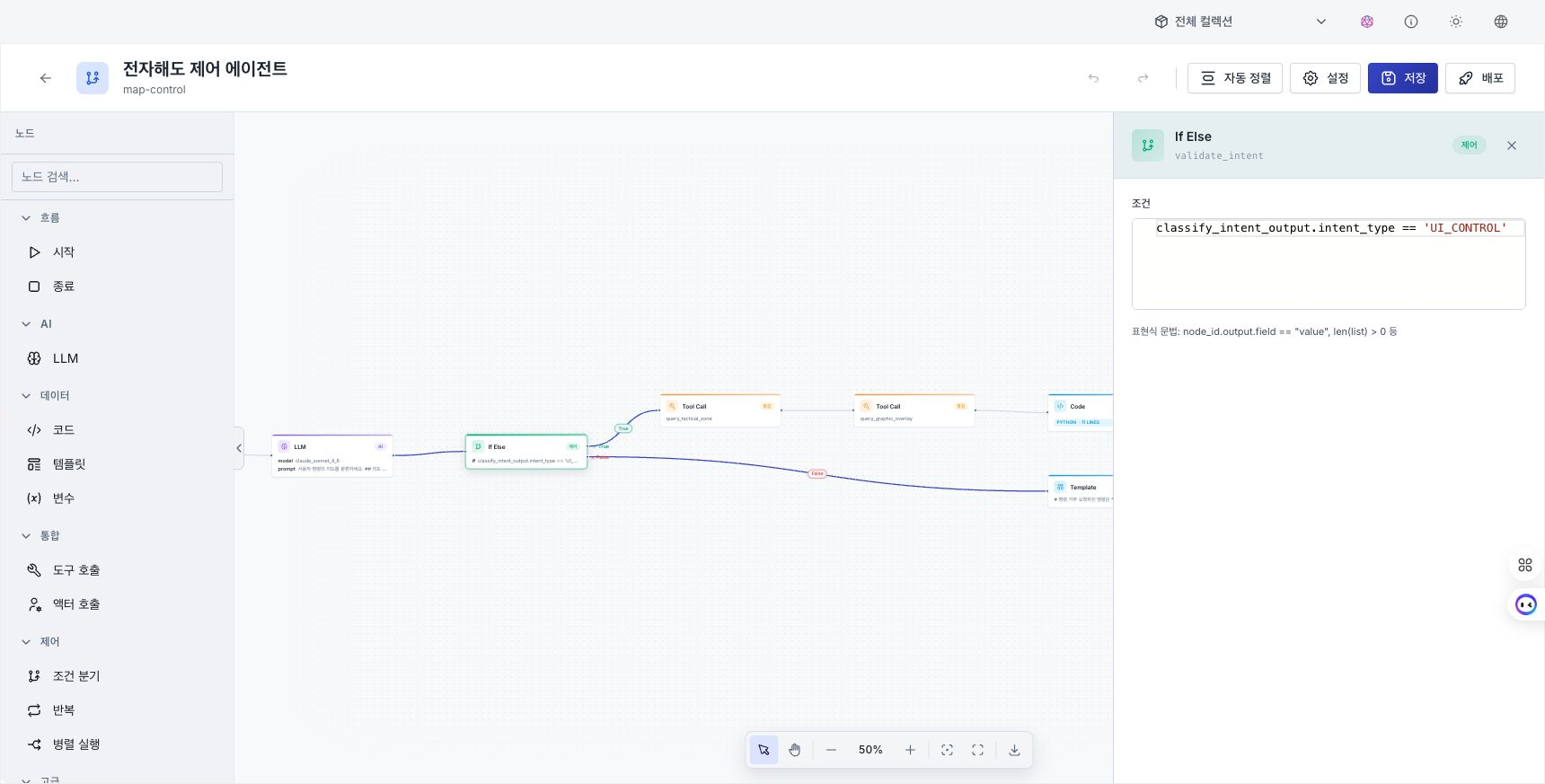
Basic workflow
- In the Start node, define each input variable's name, type, required state, default value, and description.
- Drag a node from the palette, or drop an output connector onto empty canvas and select the next node.
- Select the node and configure its inputs, outputs, and execution options in the properties panel on the right.
- In the End node, map the output names, types, and values to return.
- Save the workflow, then select Deploy.
Map a node output to a later node input by using a nodeName.field value reference. Use the output picker in the properties panel to reduce typing errors.
Main settings by node
| Node | Settings and result |
|---|---|
| Start | Declare execution input variables. |
| End | Map final output names, types, and values. |
| LLM | Configure the model, reasoning effort, prompt and system prompt, and output variables. |
| Code | Configure Python or JavaScript source, input mappings, and a timeout. Data-connection and RAG code insertion are available. |
| Template | Render template content and save it to an output variable. |
| Variable | Apply set, append, merge, increment, decrement, and delete operations in order. |
| Tool Call | Configure a tool, input mappings, and a timeout. |
| Actor Call | Configure an actor, input mappings, and a timeout. The approval policy supports only immediate execution with auto. |
| If / Else | Evaluate an expression and split the flow into true and false connectors. |
| Loop | Configure list or count mode, a source and iterator or count and counter, and maximum iterations. |
| Parallel | Configure branches, an all / any join mode, and a timeout. |
| Error Handler | Configure the target node, retry count and interval, fixed or exponential backoff, and fallback, skip, or stop behavior. |
A workflow cannot wait for user approval while running. Use actors that require human approval in a chat or ReAct agent. If a saved graph still has an Actor Call policy of confirm or deny, change it to auto before deploying. Replace unsupported Agent or User input nodes in older graphs with supported nodes.
Branches and termination conditions
- Connect the If / Else node's true and false connectors to their respective next nodes.
- Connect nodes to repeat through the Loop body path and connect the next path to the node that runs after the loop. Set maximum iterations to prevent an infinite run.
- In Parallel,
allwaits for every branch andanyjoins after one branch completes. Set a timeout as well. - Separate the success and fallback paths from an Error Handler. If no fallback runs, review whether the result is skip or stop the entire workflow.
Connection constraints
The following connections cannot be created.
- A connection from a node back to itself
- A connection into the Start node
- A connection out of the End node
- A duplicate with the same source, target, and connector
- A connection that creates a cycle
The Start and End nodes cannot be deleted or duplicated. For other nodes, use the context menu to edit, duplicate, disconnect, or delete. Select multiple nodes to align or distribute them, or use Auto layout to arrange the entire graph.
Save, deploy, and redeploy
Saving stores the edited graph. Both Start and End nodes are required for deployment. If either is missing, an error identifies the missing node.
After changing node structure, settings, or connected semantic assets on a running agent, Redeploy required appears. Moving only a node's position does not change the runtime definition and therefore does not require redeployment.
Workflow agents run through events rather than chat. See Deploy an agent for execution methods.