Choose an AI feature
D.Hub AI features differ in where they run and what information they reference. Open D.Hub Assistant to ask about assets on the current screen. Use AI Chat on a knowledge detail screen to receive answers grounded in collected documents. Use AI code generation and AI editing in the code editor to create or revise pipeline code.
Ask about the current screen
Select the AI icon on the right side of the screen to open the D.Hub Assistant side panel. Mention a dataset, collection, code asset, or pipeline with @ to receive an answer based on that asset's information and the signed-in user's permissions.
Choose the response model with Model selection below the input field. To register or manage models, open More → Settings → Model management in the panel header.
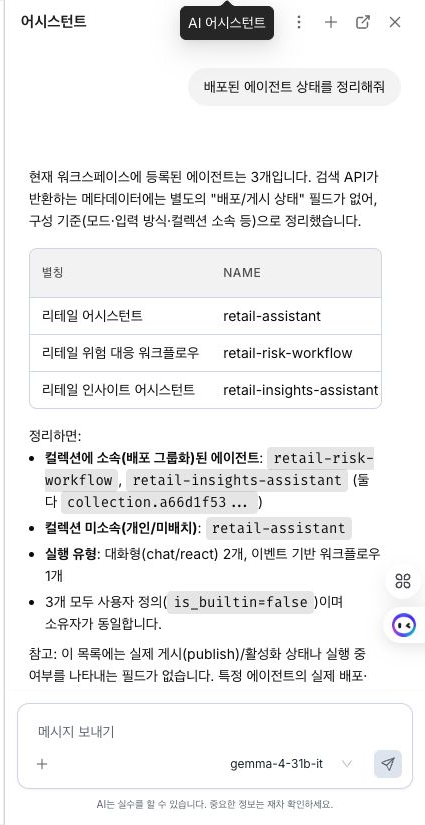
See Use D.Hub Assistant for panel entry points, conversation history, @ mentions, and visualizations.
Ask questions grounded in collected documents
The AI Chat tab on a knowledge detail screen searches documents collected in that knowledge and uses them as evidence for its answer. The response also cites the original source documents.
See Knowledge AI Chat for the procedure for asking questions about a specific knowledge's documents.
Create and revise pipeline code
In the pipeline code editor, select AI or press ⌘I (macOS) / Ctrl+I (Windows) to generate Python or SQL code from a natural-language request. Run the same command with existing code selected to receive a proposed edit for the selected section.
Review the proposal, then select Insert to apply it or Cancel to discard it. See Create and edit code with AI for entry points and the review workflow.
Before you begin
- You must select a model before using D.Hub Assistant.
- AI features respect the signed-in user's asset access permissions.
- Verify generated code and answers against the source data and execution results before applying or sharing them.
Next steps
- Use D.Hub Assistant — Mention an asset on the current screen and ask a question.
- Create and edit code with AI — Use pipeline code generation and inline editing.
- Knowledge AI Chat — Ask questions grounded in collected documents.