Recents
The Recents page (/recents) is a list of recently modified items in one place. Go to the Recent Items menu in the sidebar.
It brings together various types of resources and displays them sorted by last modified time. By using search, type, and period filters, you can quickly select only the items you want. While the Recent Items on the home screen is a simple list containing only collections, code, pipelines, and knowledge, this page also covers datasets, ontology entities/relationships, and agents.
Screen composition
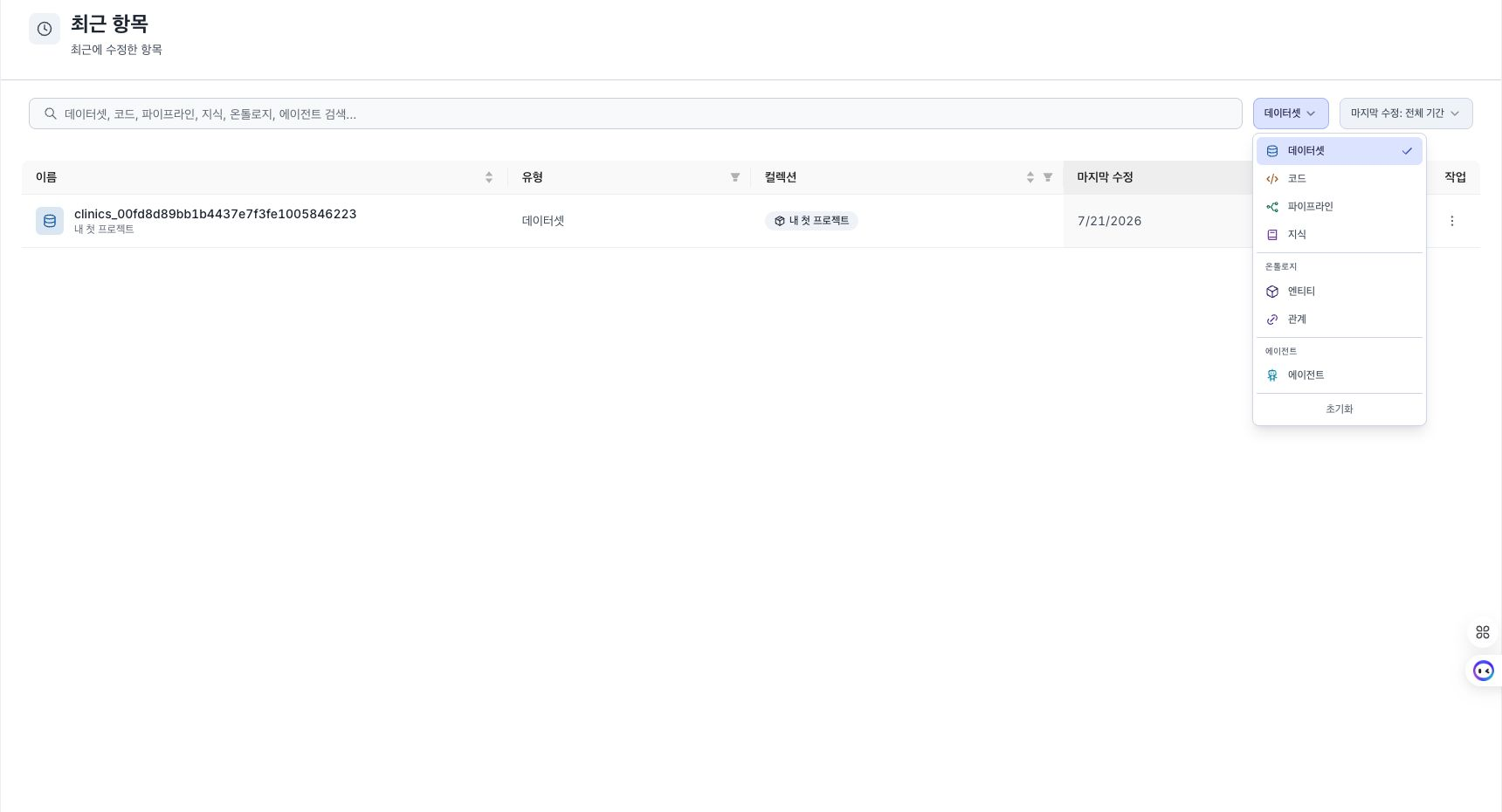
list (table)
The following columns are displayed in the list, and when you click the column header, the list is sorted by that column.
| column | Description |
|---|---|
| Name | Resource type icon and name (alias if one exists). Collection affiliations are listed below in small text. |
| Type | Resource type of item (Dataset / Code / Pipeline / Knowledge / Entity / Relationship / Agent, etc.) |
| Collection | Affiliation collection tag. You can filter by collection in the column header. |
| Last Modified | Display the last modified time in relative time (default is sorted by latest) |
Clicking on a row takes you to the edit/detail screen for that item. Ontology entities and relationships are the corresponding items of the ontology builder, and agents are connected to the agent builder.
filter
The upper filter area contains three filters:
- Search: Find a partial match by name or belonging collection name.
- Type filter: You can select multiple types among dataset, code, pipeline, knowledge, entity, relationship, and agent (entities and relationships are grouped into ontologies, and agents are grouped into agent groups). If you don't select anything, all types will come out. Each item is accompanied by a colored icon for the resource type.
- Period Filter (Last Viewed,
Last viewed): Select one of Always / Within 24 hours / Within 7 days.
Page sharing
Up to 25 items are displayed on one page, and if there are more than 25 items, a page break appears at the bottom.
Items displayed
The Recent Items page displays recent modifications to the following resources:
| Type | Remarks |
|---|---|
| Dataset / Code / Pipeline / Knowledge | Data Operations Resources in Collection |
| Entity / Relationship | Items in ontology model |
| Agent | Agent created in Agent Builder |
- Each type has a unique color icon to distinguish it at a glance.
- Collections themselves do not appear on the Recent Items page (collections are managed from the Collections screen).
Differences from home screen recent items
| Category | Home Recent Items | Recent Items Page |
|---|---|---|
| display count | Up to 12 cases | 25 per page (split into pages) |
| Inclusion Type | Collection · Code · Pipeline · Knowledge | Dataset · Code · Pipeline · Knowledge · Entity · Relationship · Agent |
| filter | None | Search / Type / Period |
| entry | Home Main | Sidebar Recent Items Menu |
Pressing the View All button on the home screen's recent items takes you to the collection screen (/collections). The Recent Items page is accessed from the Recent Items menu in the sidebar.
When empty
- If there are no recent items yet, a guidance message will be displayed along with the Go to Collection button.
- If no items match your filter combination, the message “No recent items match your criteria” will be displayed. Clear your filters with Reset or expand your search.