Semantic tables
Under AI → Semantic Layer → Semantic Tables, define the table information used for natural-language queries. Select a collection and data connection and add routing descriptions before configuring columns and metrics.
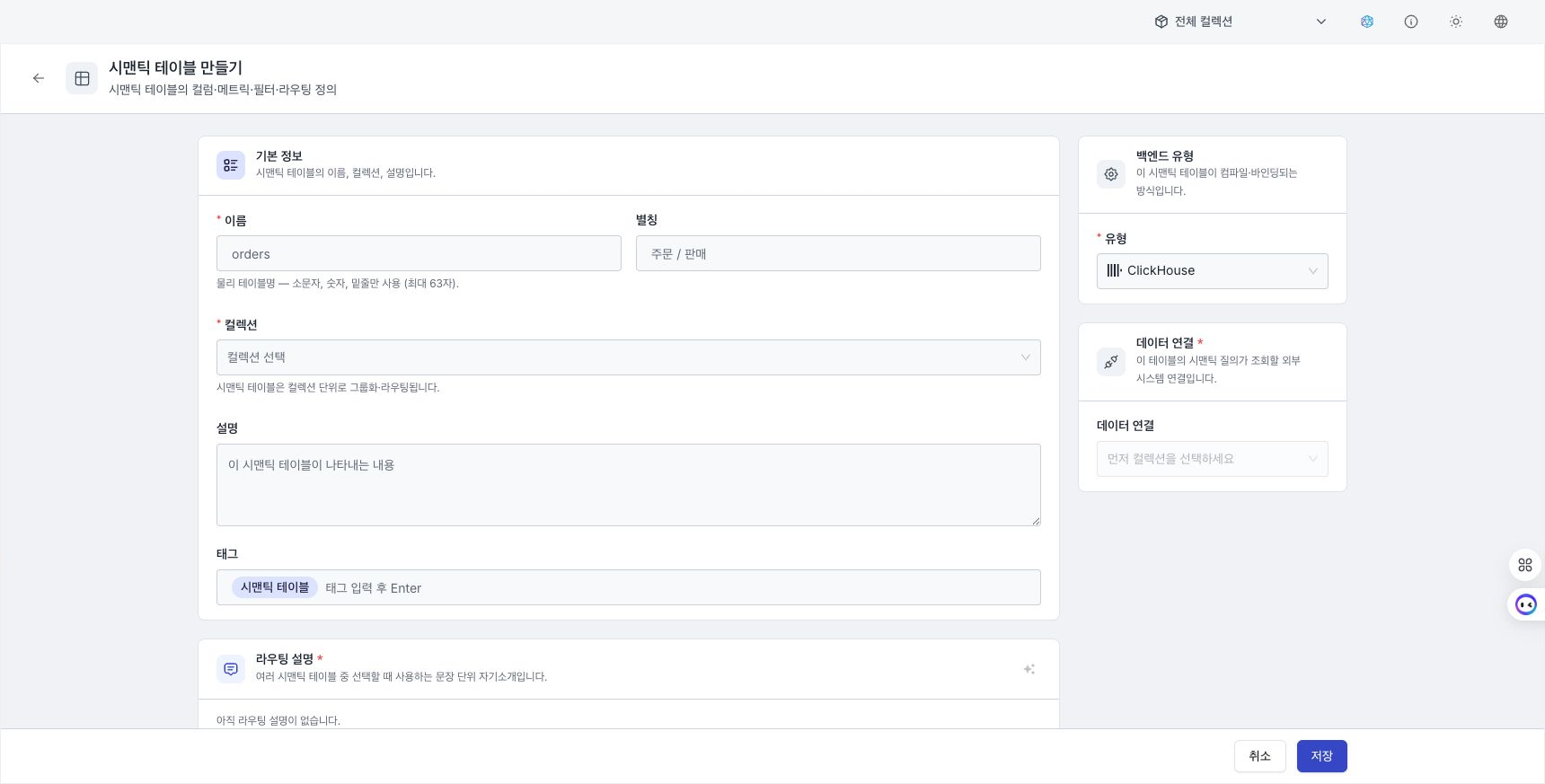
Basic information and data connection
- Select Create semantic table.
- Enter a name, alias, collection, description, and tags. The name must begin with a letter, contain only lowercase letters, digits, and underscores, and be no longer than 63 characters.
- Select ClickHouse / PostgreSQL / OData v2 / OData v4 as the backend type.
- Select a collection, then select the Data connection to use.
A data connection is required. Connections in the selected collection, built-in connections, and global connections are shown as candidates. If names match, a connection in the selected collection takes priority. You cannot save if the connection cannot be found or you do not have permission to use it.
Routing and authoring instructions
- Routing descriptions: Describe when this table should be selected among multiple tables. At least one is required, and AI can draft the text.
- Authoring instructions: Enter business rules that apply when a query is generated for this table.
- Related tables: Select tables in the same collection that should be searched together. This reference assists routing; it does not define a join relationship.
You cannot save while an unresolved related-table reference remains. Select it again from the current collection or remove the reference.
Configure columns
Edit columns in Structured / JSON mode.
- Enter the name, Categorical / Time type, description, and example values.
- Configure Expose to LLM / Filterable / Sortable / Groupable for each column.
- ClickHouse and PostgreSQL support SQL calculated expressions. OData v2 and v4 do not support calculated column expressions.
- Select None / Embedded / External for the value dictionary. An external dictionary references a shared value dictionary in the same collection.
Manage canonical values and synonyms in an embedded value dictionary. Deleting a column also deletes its embedded dictionary, so review the impact in the confirmation dialog. A table with an unnamed column or duplicate column names cannot be saved.
Metrics and filters
Define metrics and reusable filters as arrays in advanced JSON.
| Item | Content |
|---|---|
| Metric | simple, ratio, derived, cumulative, conversion |
| Filter | A reusable condition composed of a name and clauses[] |
visible: false | Keep compiler references while hiding the item from the LLM catalog |
OData v2 provides additional OData options JSON such as service bindings. Invalid JSON or a non-array value cannot be saved.
Review save errors
If the table is not saved, check duplicate column names, required routing descriptions, data-connection permission, related-table scope, and JSON format in that order.
Next steps
- Manage shared canonical values and synonyms in Value dictionaries.
- Create validated queries that reference this table in Query templates.
- Connect the semantic table to an agent under Create an agent.
- Review and restore previous column or metric configurations under Version history.