AI Code Generation and Editing
D.Hub's pipeline code editor has a built-in AI coding assistant. Describe the desired logic in natural language to auto-generate code, or select existing code to request modifications from AI.
AI Code Generation
Use the AI code generation feature when writing new code from scratch.
How to Use
[Screenshot] AI Code Generation Prompt Screen
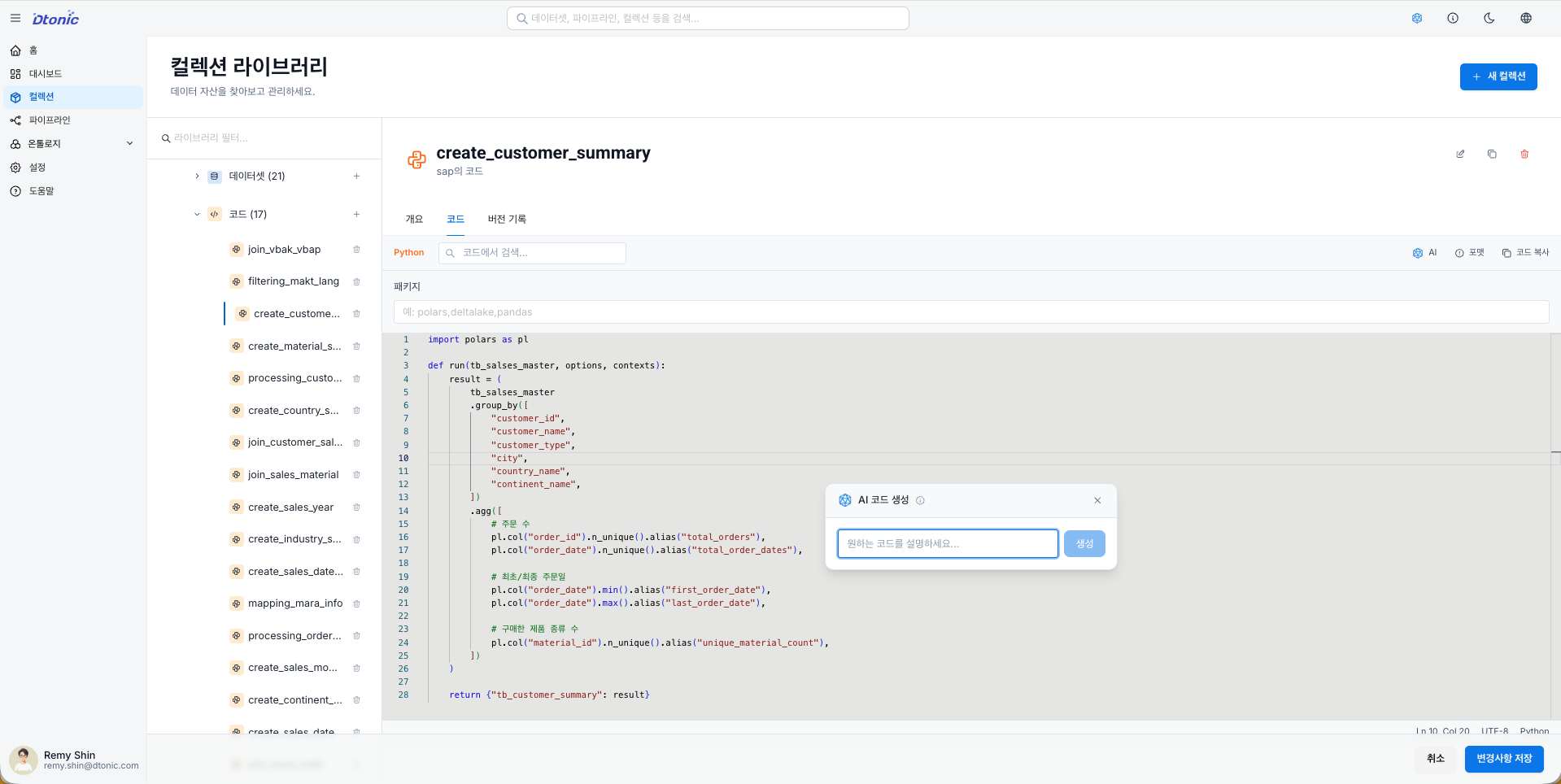
- Open the code node editor in the pipeline.
- Click the AI button in the toolbar or press the shortcut
Cmd+I(Mac) /Ctrl+I(Windows). - When the prompt input field appears, describe the desired logic in natural language.
- Press the Generate button and AI will write the code and show a preview.
- If the result is satisfactory, press Accept to apply it to the editor; otherwise, press Reject to cancel.
Supported Languages
Python (polars)
D.Hub's Python code nodes process data using the polars library.
The code generated by AI automatically conforms to the pipeline's input/output specifications.
- Retrieves dataframes from previous nodes via the
inputsdictionary. - Assigns processing results to the
outputvariable. - Generates efficient code leveraging polars' Expression API.
Prompt examples:
- "Filter only rows where 'status' is 'active' from the input data"
- "Calculate the daily sum of the 'amount' column and sort the results in descending order"
- "Join the two input dataframes based on the 'id' column"
SQL
Supports standard SQL syntax with automatic mapping of input table names.
Prompt examples:
- "Aggregate monthly total revenue from the sales table"
- "Join the customers table with the orders table and retrieve only customers with orders in the last 30 days"
Inline AI Editing
Use the inline AI editing feature when modifying or improving already written code.
How to Use
[Screenshot] AI Inline Editing Screen
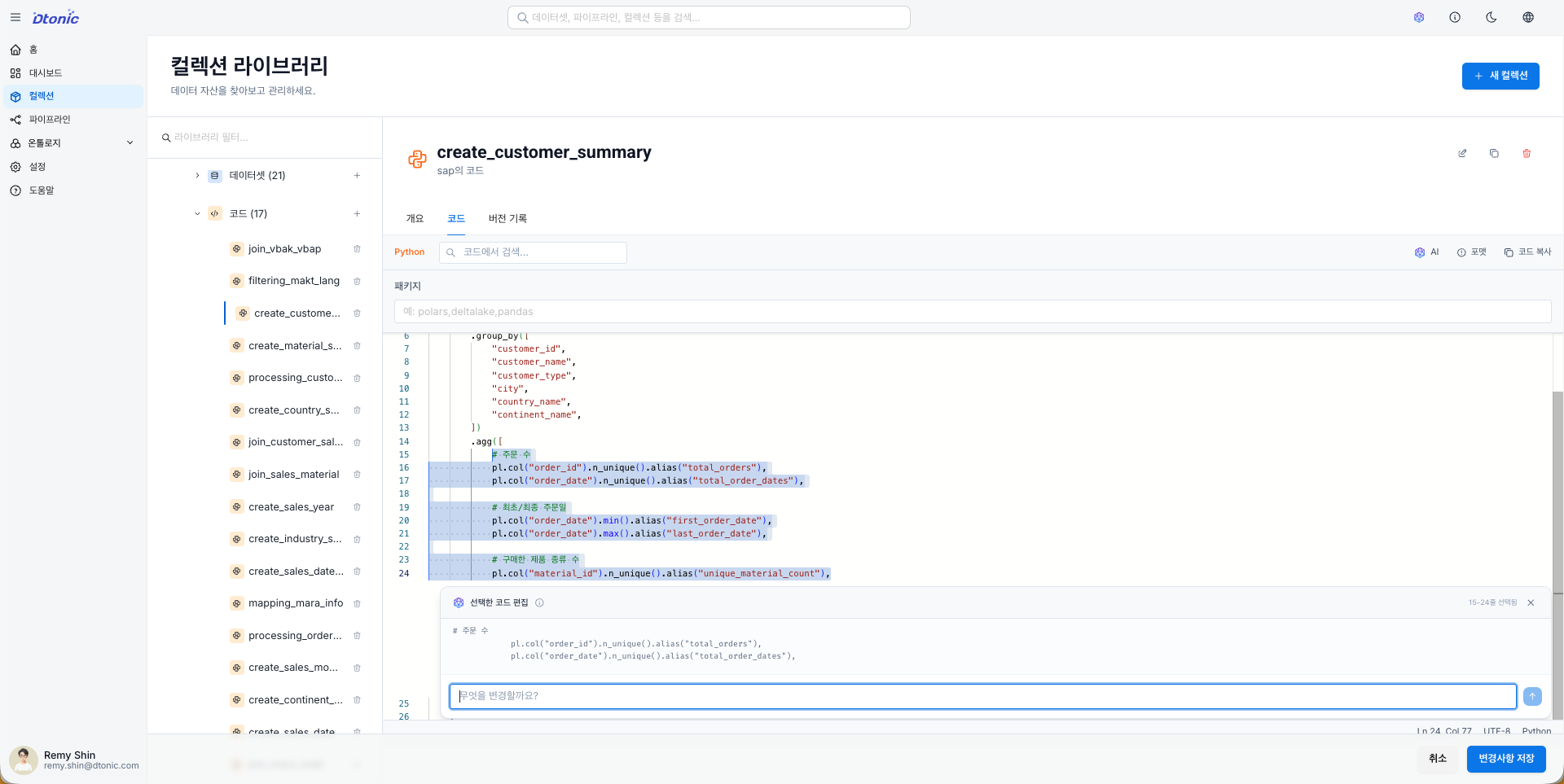
- Drag to select the code region you want to modify in the editor.
- Select an editing option from the AI selection menu that appears near the selection, or press
Cmd+I/Ctrl+Ito open the inline prompt. - Enter your modification instructions in the prompt input field.
- AI-suggested changes are displayed as a code block.
- After reviewing the changes, select Accept or Reject.
Usage Examples
| Request Type | Prompt Example |
|---|---|
| Improve variable names | "Rename the variables to be more intuitive" |
| Add error handling | "Add null value handling logic to this part" |
| Performance optimization | "Convert this loop to polars Expressions" |
| Add comments | "Add explanatory comments to each step" |
| Modify logic | "Change the filter condition from 'active' to 'completed'" |
Available Context
AI automatically references the current working environment's context when generating or editing code.
| Context | Description |
|---|---|
| Dataset Schema | Column names and data type information from input datasets connected to the code node |
| Pipeline Structure | Input/output relationships of the current node and output format of previous nodes |
| Existing Code | Code already written in the editor (during inline editing) |
The richer the context, the higher the quality of AI code generation. When generating code with datasets connected, you can get code that accurately reflects column names and types.
The more specific the prompt, the more accurate the generated code.
Less specific: "Process the data"
More specific: "Filter only the last 7 days of data based on the 'created_at' column from the input data, and calculate the 'amount' sum by 'category'"
Shortcut Summary
| Action | Mac | Windows/Linux |
|---|---|---|
| AI Code Generation / Inline Editing | Cmd+I | Ctrl+I |
FAQ
Q: The AI-generated code doesn't run.
- Try specifying the input/output format more concretely in your prompt.
- Check that datasets are properly connected to the node. The AI references the schema of connected datasets.
Q: Inline editing doesn't work.
- You must first select a code region before pressing
Cmd+I/Ctrl+Ito activate inline editing mode. - When nothing is selected, it operates in code generation mode.
Q: How do I specify table names in SQL mode?
- AI automatically maps the names of pipeline input nodes to table names. Simply mention the tables in natural language in your prompt.
Important Notes
- Always review AI-generated code before execution. It may contain unexpected logic.
- For complex business logic, request in multiple steps rather than all at once for better results.
- Carefully review the Diff View before applying inline edits. Unintended changes may be included.
- AI features require an internet connection, and response times may vary depending on the LLM service status.